
Zapier vs Make: Which Automation Tool Is Right for You
A practical comparison of Zapier and Make that breaks down ease of use, pricing, and automation power to help you choose the right workflow tool.
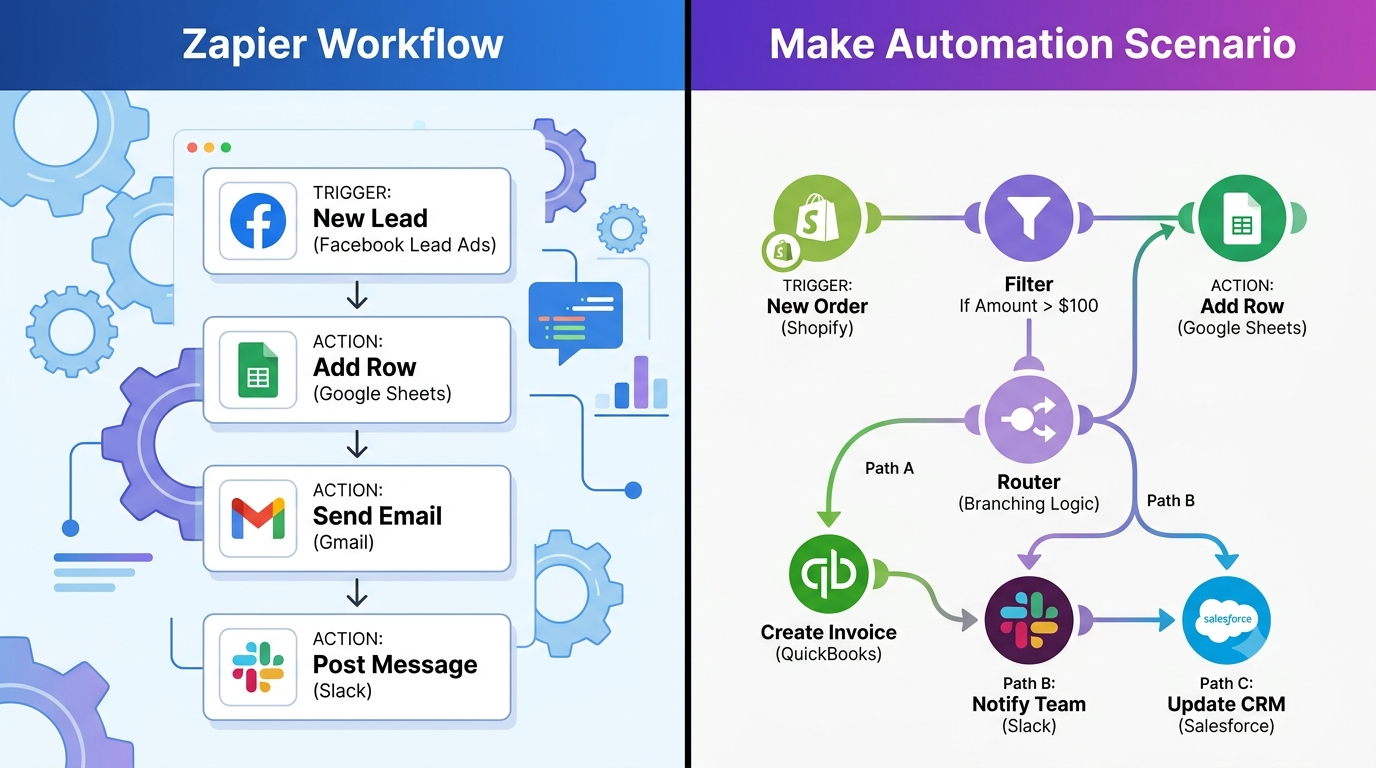
Zapier and Make both help you connect software and automate daily tasks without writing a line of code. Yet, they handle things quite differently—so picking the wrong platform can leave you stuck down the road. Zapier focuses on getting you up and running in minutes. Make, on the other hand, excels when your workflows demand complex, non-linear logic. There is no single winner here. The right choice ultimately boils down to how intricate your automations need to be and how much time you want to spend learning the ropes.
Quick recommendation
Choose Zapier if you are new to automation and want a working setup today. Its simple layout and massive app library make it the easiest starting point for straightforward, linear tasks. Choose Make if your processes involve branching paths, multiple conditions, or complex multi-step dependencies. While it takes longer to master, its visual canvas gives you far greater control—often at a significantly lower cost as your volume grows.
At a Glance: Key Differences
| Criteria | Zapier | Make |
|---|---|---|
| Best for | Simple, linear automations; fast setup | Complex workflows with branching logic |
| Learning curve | Lower — guided, step-by-step builder | Higher — visual canvas, more concepts to learn |
| App integrations | Very large library, broad third-party support | Large library, strong for technical/API-based apps |
| Pricing model | Priced by number of zaps and tasks run | Priced by number of operations, often cheaper at scale |
| Complex logic | Limited without added paid features | Native support for branching, routers, and filters |
| Visual workflow view | List-based, less visual | Full visual canvas showing the entire flow |
Where Zapier Is Strongest
Zapier shines when you need a working automation immediately. Setting up routine tasks—like logging form entries into a spreadsheet or sending a Slack ping when a deal closes in your CRM—takes under ten minutes without any technical experience. Its extensive integration catalog is another massive win. If you work with specialized or smaller web tools, Zapier is far more likely to support them out of the box.
Where Make Is Strongest
Make shines when workflows get complicated. Tasks requiring multi-condition checks, data splitting across different paths, or merging multiple inputs before taking action are far clearer to map out visually on Make than as a massive step-by-step list. Its pricing model also heavily favors teams handling high volumes. Because Make charges by execution operations rather than per active automation, heavy usage often stays much friendlier on your budget.
Pros
- Visual canvas simplifies complex flows, highly cost-effective at scale, and strong native support for conditional branching.
Cons
- Steeper initial learning curve, feels unnecessary for basic single-step tasks, and fewer beginner templates compared to Zapier.
Make: Strengths & Tradeoffs
Pros: Visual canvas simplifies complex flows, highly cost-effective at scale, and strong native support for conditional branching. Cons: Steeper initial learning curve, feels unnecessary for basic single-step tasks, and fewer beginner templates compared to Zapier.
Practical Tip
Sketch your workflow on paper before building. List every condition and decision point. If it remains a straightforward line, Zapier is likely your easiest route. If it splits or branches more than once or twice, Make's visual editor will save you considerable time.
Real-World Use Cases: Which Tool Fits Which Job?
To see how these differences play out in real life, consider a few common workplace scenarios:
Scenario A (Simple Sales Lead Alerts): A small sales team wants to capture leads from a website contact form, post an alert in a team Slack channel, and append the lead details to a Google Sheet. Because this process flows straight from point A to point B to point C without conditional deviations, Zapier handles it effortlessly in just a few clicks.
Scenario B (Multi-Branch E-Commerce Logistics): An e-commerce business needs to process incoming order webhooks, inspect the customer tier, convert currencies, router high-value orders to a priority fulfillment pipeline while flagging international shipments for manual compliance review, and retry failed API requests automatically. Designing this in Zapier would require multiple nested Zaps or expensive add-on modules. On Make's visual canvas, you can map out every branch, error handler, and data transformation visually on a single screen.
Error Handling and Debugging
Another key differentiator is how both platforms handle unexpected failures—such as a CRM API downtime or an invalid data format. Zapier Error Handling: Zapier offers automated email notifications and simple task replay features. If a step fails, Zapier pauses execution and alerts you. While clean and functional, troubleshooting complex data mismatches inside a linear step editor can sometimes feel cumbersome. Make Error Handling: Make includes native visual error handling modules (such as Break, Resume, Ignore, and Commit handlers). You can visually route errors into fallback paths, automatically store failed items for retries, or inspect raw payload data directly within each node on the visual editor, making it significantly easier to diagnose high-volume data issues.
Summary
Go with Zapier if you want to automate basic tasks today without a learning curve and your workflows follow a straight line. Go with Make if your processes involve real complexity, conditional pathways, or high volumes where you need extra control and better cost efficiency. Still on the fence? Pick one recurring task you handle manually every week and build it in the platform that fits its complexity. Testing a real process is always more revealing than comparing feature tables.
More in Software Comparisons
View allFrequently Asked Questions
Is Zapier or Make better for someone who has never automated a workflow before?
Zapier is generally easier to start with, since it walks you through building a simple trigger-and-action 'zap' step by step. Make has a steeper learning curve but gives you more control once you're comfortable with it.
Which one is cheaper?
It depends on how complex your automations are. Make's pricing is based on operations rather than number of automations, which often works out cheaper for complex, multi-step workflows, while Zapier can get expensive quickly once you're running many zaps with several steps each.
Newsletter placeholder
Future weekly technology brief
This block reserves a clean, non-intrusive location for a future newsletter without changing article layouts later.
Comments placeholder
A future comments system can be added here without changing the article template.