What Is End-to-End Encryption and How It Works
A straight-to-the-point guide to end-to-end encryption—how it works, what it keeps safe, where you actually use it, and what it cannot protect.
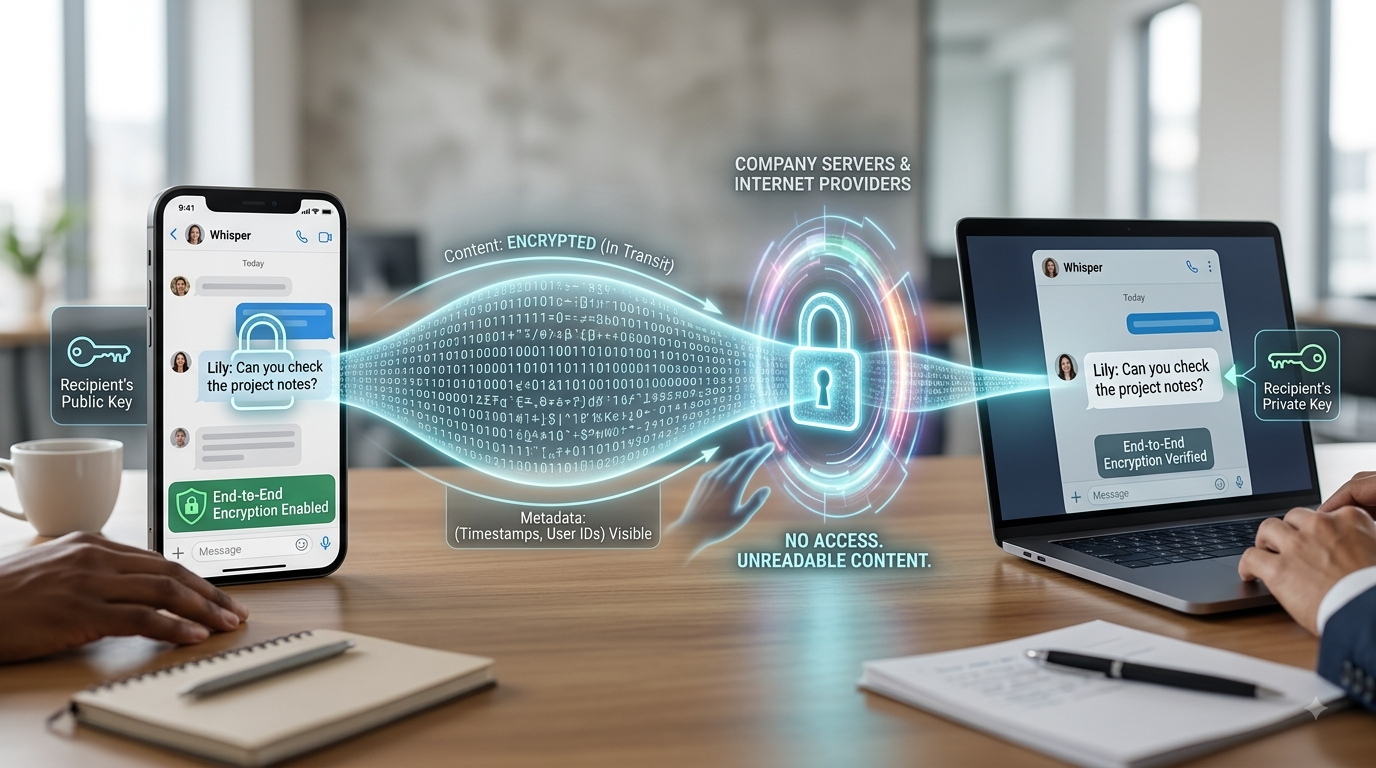
When a message is end-to-end encrypted, it gets scrambled right on your phone and stays that way until it lands on the recipient's device. No middle party can read what you wrote. Not internet providers, not hackers, and not even the company hosting the messaging service itself—even if authorities come knocking with a court order demanding access. You hear the term thrown around constantly in tech marketing these days, but it gets misused often enough that it helps to know what protection you're actually getting—and where the boundaries lie.
What it is
Plenty of apps claim to encrypt your data, but that isn't always end-to-end encryption. A standard cloud app might scramble your messages while they cross the web and keep them locked up on its servers. The catch? The company keeps the keys. That means if they want to—or if a court order forces their hand—they can unlock and read your files without much hassle. End-to-end encryption cuts the service provider out of the loop entirely. The cryptographic keys needed to unlock the conversation live exclusively on the two communicating devices. They're never stored on any central server, which is the crucial detail that sets this setup apart.
Why it matters
That distinction isn't just technical hair-splitting—it makes a massive real-world difference. Say a company's database gets hacked: intruders walk away with useless, scrambled text because plain-text versions never touched those servers. The same rule applies to government subpoenas. A companyusing end-to-end encryption can't turn over readable chat logs even under heavy legal pressure, simply because they don't possess the keys to decode them. It also shuts down internal risks. Curious engineers or rogue employees at the tech firm can&'t snoop through user chats on a slow afternoon, because the content simply isn't accessible to them in readableform.
How it works
Behind the scenes, the mechanics rely on a pair of mathematically linked keys created right on your device: a public key and a private key. Think of the public key like an open padlock you hand out freely. Anyone can use it to lock a box intended for you. The private key, on the other hand, is the physical key that opens that padlock—and it never leaves your device. When you send a text, the app locks the message using your friend's public key. Once locked, only their matching private key can open it back up into plain English.
Where you'll encounter it
You run into this security model in several everyday tools:
Dedicated messaging apps like Signal, which encrypts all communications out of the box, and WhatsApp, which handles all texts and calls this way by default.
Apple&'s iMessage system, provided both sender and receiver are on Apple hardware.
Secure backup options offered by certain platforms, though you often have to dig into settings to toggle them on manually.
What it does not do
While end-to-end encryption shields the actual words you type, it usually leaves metadata exposed. That means the provider might still log who you talked to, what time you reached out, and how frequently you communicate. Even if nobody can read what you said, the digital footprint showing who you're talking to remains visible unless the software takes extra measures to hide those trails.
Summary
At its core, end-to-end encryption ensures that only sender and receiver can read a conversation, relying on device-generated key pairs while leaving the service provider without any decryption master key. This shields your conversations against server hacks, legal requests, and nosey company insiders. Yet it offers no protection for metadata, infected devices, or messages that get screenshotted or forwarded down the line. If keeping your private conversations private matters to you, take a moment to verify that the app you rely on actually turns end-to-end encryption on by default, rather than burying it deep within an optional settings menu.
More in Technology Explained
View allFrequently Asked Questions
Is regular encryption the same as end-to-end encryption?
Not quite. Standard encryption shields data in transit or sitting on a server, but the service provider usually keeps the master key, meaning they can still unlock and read your files or messages. End-to-end encryption changes that completely—only you and the person on the other side hold the keys, rendering the middleman just as blind to the content as any outside hacker.
Which apps actually use end-to-end encryption by default?
Signal turns it on for everything automatically. WhatsApp does the same for all text chats and calls. If you use Apple's iMessage, it's enabled whenever you chat with another Apple user. On the flip side, traditional SMS text messages and standard email don't offer end-to-end encryption out of the box.
Newsletter placeholder
Future weekly technology brief
This block reserves a clean, non-intrusive location for a future newsletter without changing article layouts later.
Comments placeholder
A future comments system can be added here without changing the article template.