What Is Two-Factor Authentication and How It Works
A clear explainer on two-factor authentication: what it actually does, why it matters for your accounts, how it works, and what it does not protect against.
Two-factor authentication—often shortened to 2FA—simply means proving your identity using two separate types of evidence instead of just a single password. Think of your password as the first check. The second check relies on something else entirely, most commonly a code generated on your phone, which someone who only managed to steal your password wouldn't have. It's easily one of the simplest security upgrades you can turn on today. Yet, plenty of people keep putting it off because it feels like an unnecessary extra step. Here is what it actually does behind the scenes, along with where its protections hit a wall.
What It Actually Is
Security professionals generally sort proof of identity into three distinct categories:
• Something you know: Passwords, passphrases, or PINs.
• Something you have: Your mobile phone, an authenticator app, or a physical security key.
• Something you are: Biometrics like your fingerprint or facial recognition.
Logging in with just a password relies entirely on the first category. Two-factor authentication introduces a second category on top of it, meaning an attacker needs pieces from both categories simultaneously to open your account. That distinction matters because simply making your password longer or more complex doesn't change the underlying math. A super-strong password is still just one factor. If it gets leaked in a data breach—an event that hits major companies with frustrating regularity—that password alone can be used to log right in, unless a second factor is standing in the doorway.
How 2FA Works in Practice
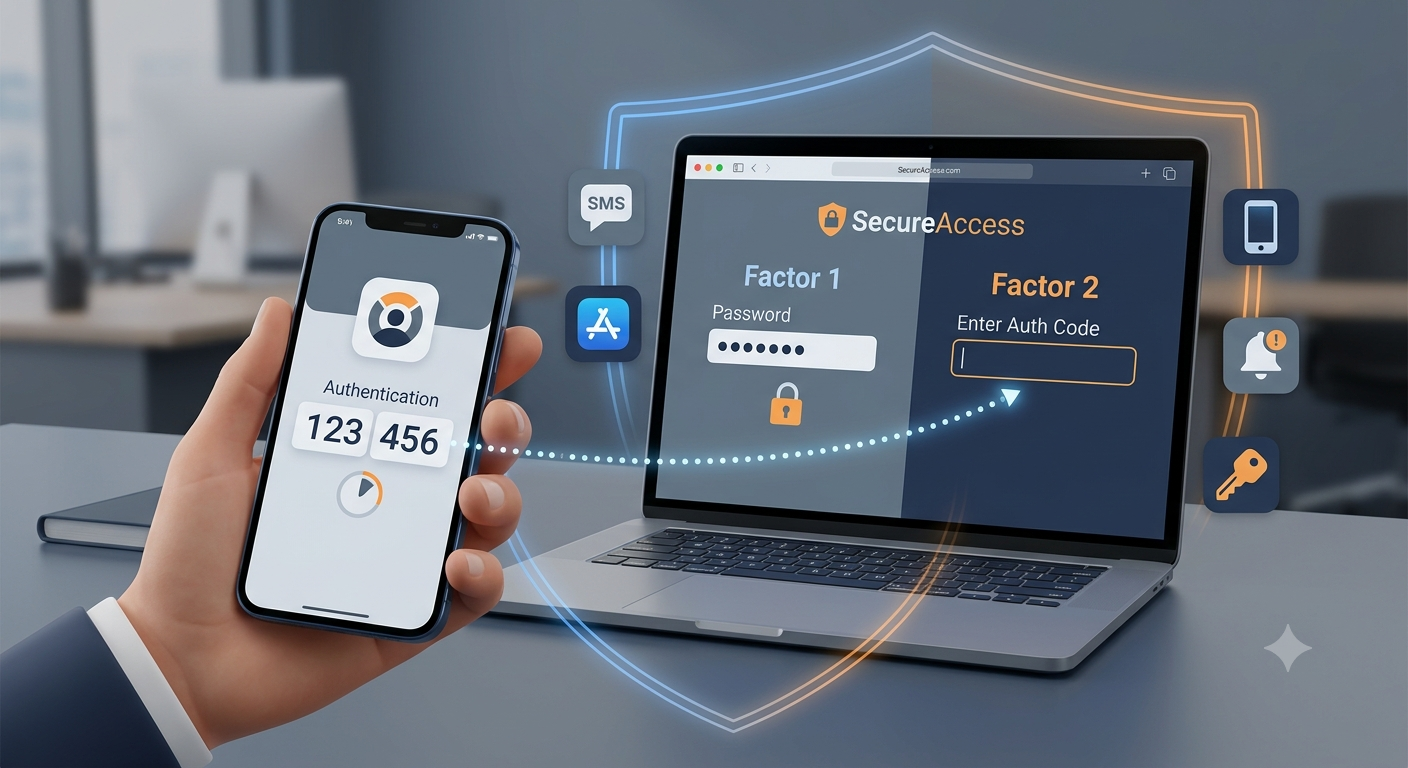
For everyday use, signing in with 2FA looks almost identical to your standard routine—there's just one brief step tacked onto the end. Here are the main ways that second step gets delivered:
• SMS Text Message Codes: A short numeric code sent directly to your mobile phone via text message.
• Authenticator Apps: Dedicated apps like Google Authenticator or Authy that generate a fresh code every 30 seconds, operating smoothly even without cell reception or Wi-Fi.
• Push Notification Approvals: A prompt sent to your phone asking you to approve or deny a login attempt with a single tap.
• Hardware Security Keys: A physical USB device (such as a YubiKey) that you plug into your computer or tap against your phone to verify it's really you.
A quick scenario: How it plays out step-by-step: You enter your email address and password on a site. Instead of taking you straight to your dashboard, the page prompts you for a six-digit code. You open an authenticator app on your phone, read the active code, type it in, and you're through. It's worth pointing out that authenticator apps and physical security keys are far safer than text message codes. Text messages can occasionally be intercepted through SIM-swap attacks, where a scammer tricks your phone carrier into transferring your number to a device they control. App-based codes stay tied to your physical device, avoiding that vulnerability altogether.
The Blind Spots: What 2FA Doesn't Do
Two-factor authentication is a massive security upgrade, but it isn't completely invincible. Sophisticated phishing sites can present fake login screens that capture both your password and your temporary 2FA code in real time, immediately using them before the code expires. It also won't offset the risk of relying on weak or recycled passwords. 2FA functions as a safety net, not a replacement for strong security habits in the first place.
Where to Begin
At its core, two-factor authentication adds an independent layer of identity verification so a compromised password doesn't automatically mean a compromised account. While authenticator apps and physical keys offer stronger security than SMS texts, setting up any form of 2FA is dramatically better than relying on passwords alone. If you haven't enabled it yet, start with the accounts that matter most: your primary email—which controls password resets for almost everything else you own—and any financial or banking accounts. Most platforms let you set it up in just a couple of minutes right from their security settings page.
Summary
Two-factor authentication (2FA) adds a second layer of defense beyond standard passwords by requiring two distinct types of identity verification before granting access. While passwords rely solely on "something you know," 2FA pairs this with "something you have" (such as a phone or physical key) or "something you are" (biometrics). This setup effectively blocks unauthorized logins even when a password is stolen in a data breach. Although authenticator apps and hardware security keys offer superior protection over SMS text codes, 2FA is not completely invincible—it cannot prevent real-time phishing attacks or compensate for weak, reused passwords.
More in Technology Explained
View allFrequently Asked Questions
Is two-factor authentication the same thing as using a stronger password?
No. A complex password is still just one factor—something you know. Two-factor authentication adds a completely separate category, usually something you physically hold like your phone. That way, even if someone steals your password, they still can't get into your account.
Which type of two-factor authentication is the safest?
Authenticator apps and physical hardware keys are safer than SMS text codes. Text messages can be intercepted through SIM-swap scams where an attacker hijacks your phone number. Any second factor is far better than none, but app-based codes are a meaningful step up from text messages.
Newsletter placeholder
Future weekly technology brief
This block reserves a clean, non-intrusive location for a future newsletter without changing article layouts later.
Comments placeholder
A future comments system can be added here without changing the article template.